toolswitch
9 everyday tools in one tiny app that waits in your tray. The AI ones — remove backgrounds, audio to text, text from screen — run on your computer: nothing is uploaded, no account, no subscription.
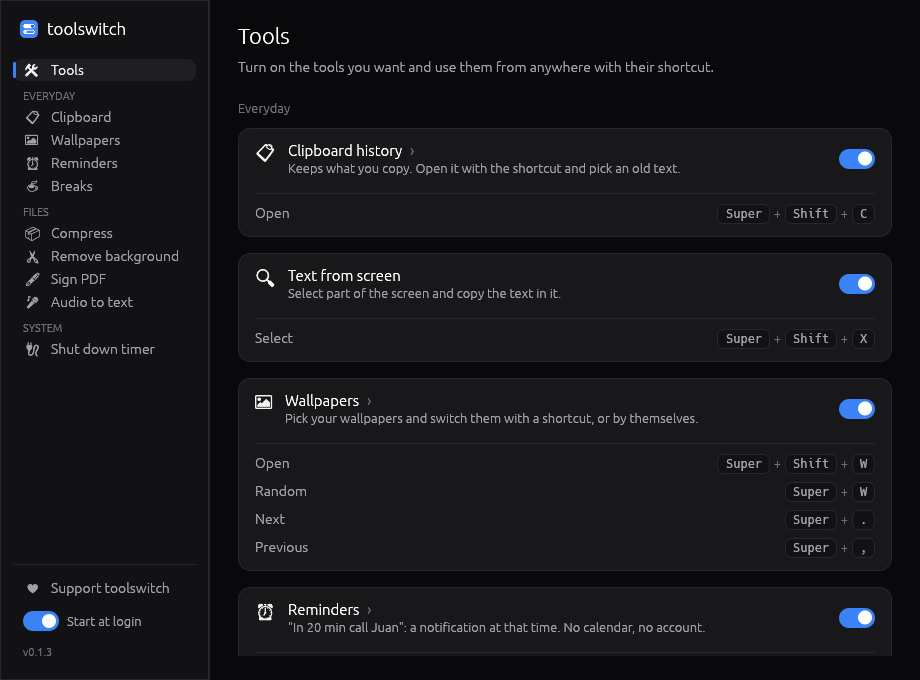
9 tools, one app
Clipboard history
Everything you copy, text and images, one shortcut away. Search it and pin favorites.
Text from screen
Select part of the screen and copy the text in it (OCR). Accents, ñ and tables included.
Wallpapers
Pick your wallpapers and switch them with a shortcut or every few minutes.
Reminders
Write “in 20 min call Juan” and get a notification then. No calendar, no account.
Breaks
Rest your eyes every 20 minutes (20-20-20), or work with a Pomodoro timer.
Compress files
Smaller JPG, PNG, PDF, Word, PowerPoint and Excel files. Your originals stay untouched.
Remove background
Transparent PNG of any photo, with an AI model that runs on your computer.
Sign PDF
Draw your signature once, drag it to its place on the page and sign PDFs without printing.
Audio to text
Voice notes, WhatsApp audios, recordings and videos into text, offline, in ~100 languages.
How to use it
- Download and install toolswitch. It starts in your tray / top bar.
- On the welcome screen, turn on the tools you want.
- Use them from anywhere with their shortcut, for example
Super+Shift+Vfor the clipboard (Ctrl+Alton Windows,Cmd+Optionon Mac). - Change any shortcut by clicking it and pressing the keys you like.
First launch: the installers aren’t signed with a paid certificate yet. On Windows click More info → Run anyway; on macOS open System Settings → Privacy & Security → Open Anyway.
Questions
What is toolswitch?
A small desktop app with 9 everyday tools — clipboard history, text from screen (OCR), wallpapers, reminders, breaks, file compressor, AI background remover, PDF signing and audio to text — that waits in your tray.
Do the AI tools upload my files?
No. Background removal (BiRefNet), audio to text (OpenAI Whisper) and text from screen (PaddleOCR) run on your computer. Their models are downloaded once and then work offline. Your photos, recordings and screenshots never leave your computer.
Is it like Microsoft PowerToys?
It’s in the same spirit, but it works the same on Windows, macOS and Linux, and it focuses on everyday tasks instead of developer tools.
Can it transcribe WhatsApp voice notes and videos?
Yes. Save them to your computer and drag them into Audio to text; it reads Spanish, English and about 100 other languages.
How heavy is it?
The program is about 15 MB and uses about 90 MB of memory and almost no processor while it waits in the tray. A tool that’s off does nothing at all.
Is toolswitch free and open source?
Yes. It’s free, with no account and no ads, and its code is open source under the MIT license on GitHub. If it helps you, you can support it with a coffee.
Source code and issues: github.com/berchj/toolswitch · downloads: github.com/berchj/toolswitch-releases